What is the cheapest Twitter/X API for getting tweets?
Last updated September 26, 2026
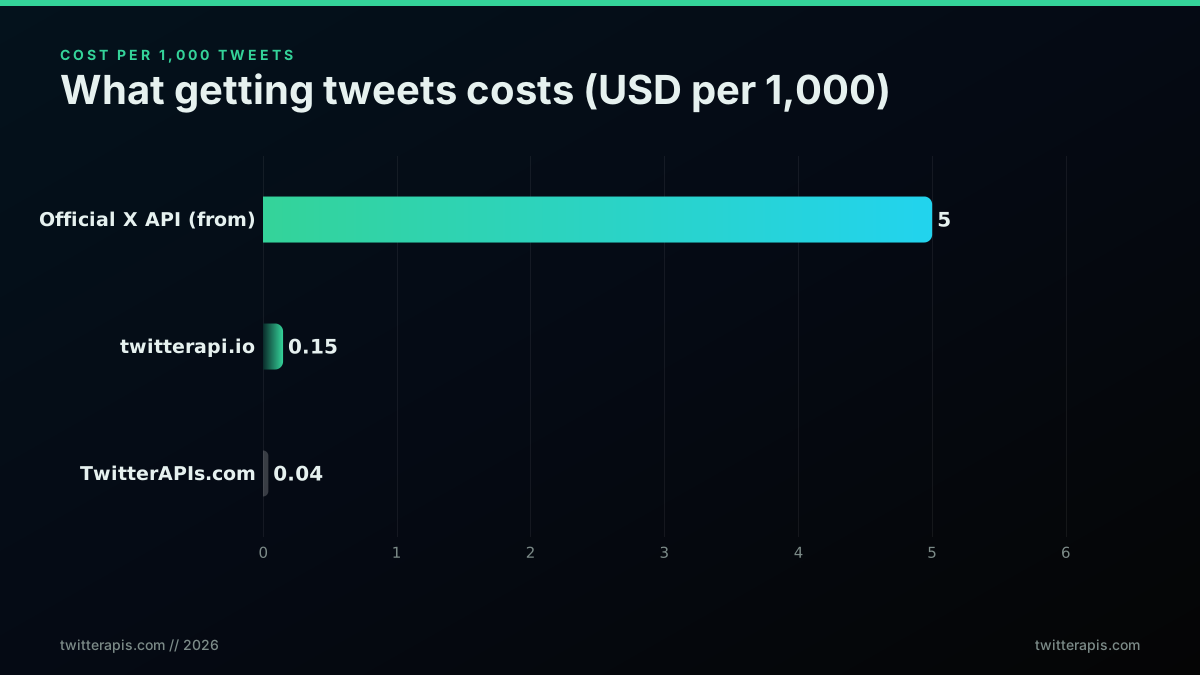
Ranked by cost per 1,000 tweets: TwitterAPIs.com leads at $0.04, twitterapi.io follows at $0.15, socialdata.tools at $0.20, Apify in a $0.25 to $0.40 band, and the official X API trails at $5 to $10. That order holds for plain reads. It shifts once a job leans on thread expansion, or once monthly volume clears the point where a flat fee divides down.
Every rate here is the pricing TwitterAPIs publishes. The billed rate is $0.0008 per call; $0.04 per 1,000 tweets is derived from it at a full 20-tweet page, which is the default page size rather than a guaranteed yield (source: twitterapis.com/pricing).
The ranking, cheapest first
Five providers, one unit, cost per 1,000 tweets. TwitterAPIs.com comes first at $0.04. twitterapi.io is second at about $0.15, close to four times more. socialdata.tools is third at about $0.20. Apify is fourth in a band of $0.25 to $0.40, wide because it charges for results and compute time rather than a flat read. The official X API finishes last at $5 to $10, two orders of magnitude off the leader, a figure that falls straight out of X's per-resource meter, $0.005 a post read and $0.010 a user read.
Normalise before you rank, and know what to divide by what
A price list is not comparable until every seller is expressed in the same unit. Convert a per-call price by dividing it by the objects one page returns: $0.0008 over about 20 tweets gives $0.04 per 1,000. Convert a per-result price by multiplying straight up to a thousand. Convert a monthly plan by dividing the fee by the allowance it bundles. Sellers that charge for compute time cannot be placed at all without a measured run, which is why their entry is a band rather than a figure.
When volume flips the ranking
A flat monthly fee gets cheaper per post the more you read against it, which is why the old comparison always hunted for a crossover volume. That comparison no longer applies to the official platform: X retired its $200 Basic and $5,000 Pro plans, and self-serve access is now metered per resource, so there is no flat fee left to amortise. Both sides are meters, and the gap between them is the unit price, $0.005 a post against $0.04 per 1,000 tweets here. The only ceiling on the official side is 3 million post reads a month, past which the route is an Enterprise contract with no published price.
When endpoint mix flips the ranking
The $0.04 per 1,000 tweets headline assumes plain reads. Change the mix and the blended rate moves with it. Thread expansion bills $0.004 a call, five times a standard read, so a job that resolves conversations rather than listing posts carries a higher blended cost. Full account history bills $0.0024. Direct message reads and tweet creation bill $0.0016. A job that is nine parts search to one part thread work sits near the headline; a job that is mostly thread work does not. Price the mix you intend to run, not the cheapest line on the card.
What to check before committing to the cheapest line
Three things separate a low price from a low bill. First, whether a floor exists: a fee charged in a month you read nothing turns a cheap rate into an expensive quarter. Second, whether access is gated, because an approval queue in front of a cheap API is a cost measured in days. Third, whether you can measure before paying, which is what the $0.50 starting balance is for, about 625 calls and 12,500 tweets with no card, enough to run the real job small and read the real meter.
Which is the cheapest Twitter API in 2026?
For reading tweets, the cheapest pay-as-you-go Twitter API in 2026 is the one that bills the call rather than the resource. TwitterAPIs.com charges $0.0008 for a standard read that returns about 20 tweets, which works out to $0.04 per 1,000. On the figures gathered on this page, twitterapi.io sits at about $0.15 per 1,000, socialdata.tools at about $0.20 and Apify between $0.25 and $0.40, while the official X API bills $0.005 for every post it returns, which is $5 per 1,000 before a single author lookup is added. The answer changes only when the job changes. If your workload is mostly full conversation expansion at $0.004 a call, or full account history at $0.0024, the blended rate rises and you should price that mix rather than the headline. If your workload is writing rather than reading, compare write prices instead, which the next section does. And if your volume is small, the cheapest option is whichever one lets you measure before paying: a $0.50 starting balance covers about 625 calls, so a modest job can finish before a card is ever involved. The ranking at the top of this page is the short answer. The sections below are the conditions under which it holds, and the ones under which it does not.
What each way to post to X costs
There are three ways to put a post on X from code, and they price very differently. The official X API bills writes per request: $0.015 to create a post, and $0.200 when that post carries a URL, so adding a link to the text makes the same action more than thirteen times as expensive. A thousand plain posts is $15 there, and a thousand posts with links is $200. Here, tweet/create bills $0.0016 whether or not the text contains a link, so a thousand posts is $1.60 either way. An image adds one media/upload call at the standard $0.0008 before the create, a post can carry up to four image media_ids, and a post with one image therefore comes to $0.0024 all in. Replies and quote posts go through the same call with reply_to or quote set, at the same price. The third way is posting by hand in the app, which costs nothing and does not scale past a person's afternoon. Two costs sit outside every price list. The account doing the posting has to be linked, which on this API means registering its session once, a free call. And X's automation rules apply to whatever you publish, whichever provider carried the request. Price the posts you will actually send: a scheduler that adds a link to every update is a very different bill on the official meter than one that does not.
Do you need a developer account to post programmatically?
Not on this API. On the official platform, posting from code means an approved developer account, a registered app and a user token for the account that posts, and every post is then billed at $0.015. Here there is no developer account and no app review. You sign up, receive one API key, and link the X account you want to post as by registering its session: the call takes that account's auth_token and ct0 values, stores them against your key and costs nothing. From then on tweet/create, replies, quotes, likes, reposts and follows run as that account. If you would rather not copy browser values, user/user_login signs in with a username and password, plus an optional TOTP secret for accounts protected by an authenticator app, and it bills $0.01 only when the login succeeds. Reads never need any of this, because every public read works on the key alone. One key can also act for several accounts, since each account's session can be registered or passed on the call itself, so a scheduling product does not need a key per customer. Posting from code is still governed by X's automation rules, which treat replies and mentions far more strictly than plain posts, and the owner of the account remains responsible for what it publishes, whichever route the request took.
How to switch from the official X API
Switching is a short list of edits followed by a longer stretch of testing. First, point the client at api.twitterapis.com and replace the OAuth block with one header, Authorization: Bearer followed by your key. Second, remap each call: recent search becomes tweet/advanced_search with the same operator string in query, a user timeline becomes user/tweets, a single post becomes tweet/detail, replies become tweet/replies, and a whole conversation becomes tweet/thread, which has no single official equivalent. Third, rewrite the parsers, because responses use their own field names rather than the v2 data and includes envelope, so code reading public_metrics needs to read favorite_count, retweet_count, reply_count and view_count instead. Fourth, replace the per-endpoint window table with one rule, 600 requests a minute and 20 in flight per key, and back off on a 429. Watch one detail while translating queries: the official API rejects min_faves: and min_retweets: with a 400 and expects min_likes: and min_reposts:, while the search here takes the web operator syntax, so an engagement floor written for one needs renaming for the other. Run both integrations on a sample of real queries for a few days, diff the ids they return, then cut over. The request side changes in an afternoon; budget the rest of the week for parsers.
Data quality at the cheapest price
A low rate is only cheap if the rows are usable, so check data quality on four points before ranking anything by price. First, completeness of the object. A search hit here is the full post object, with text, created_at, the author nested as id, username, name and verification flags, and the engagement counters, so there is no second lookup to learn who wrote it, a step the official meter bills as a separate $0.010 user read. Second, expanded links. Text arrives with URLs already expanded, so domain analysis needs no extra resolution pass. Third, honest absences. Protected accounts are absent by construction and deleted posts are gone from the source, so no provider can return either, and one that claims to is the wrong provider to use. Fourth, snapshot semantics. favorite_count, retweet_count, reply_count and view_count are values at fetch time, and view_count appears only where the source exposes it, so store the fetch time beside every row. That last point is where comparisons quietly go wrong, because two providers sampled an hour apart will disagree on counters and both be correct. Run the same twenty queries through each candidate and compare the ids rather than the counts. An hour of that teaches more about data quality than any feature table, and the $0.50 starting credit covers the test here before you pay anything.
How the cheaper alternatives work
Alternatives to the official API come in three shapes, and the shape explains the price. A hosted API reads the public surface you can see on x.com, turns it into typed JSON and sells it per call, so you get a stable contract and the provider absorbs upstream changes; that is the model behind the $0.04 per 1,000 figure here. A scraping library does the same reading on your own machine for nothing in dollars, but it breaks whenever the page it reads changes, and the repair time is yours. A marketplace actor runs a scraper as a hosted job and bills results plus compute time, which is why its price on this page is a band rather than a single number. Agent tools that answer questions about X in a chat window usually sit on top of one of these three, so their real cost is whatever runs underneath plus the model. The useful question is which failure you would rather own: a per-call bill you can predict to the cent, an engineering afternoon each time a layout shifts, or a compute bill you only learn once the run has finished. For a job that has to keep running unattended, the per-call contract tends to be the cheapest of the three once maintenance is counted, because the hours spent repairing a scraper are billed too, just not on an invoice.
Key technical challenges, and who absorbs them
Cheap access to X data is hard to keep cheap, and the difficulty lands on somebody. The key technical challenges are the same for every approach. Pagination contracts differ by route: some cursors go null on the last page while follower graph cursors keep coming back non-null, so a loop has to stop on an empty collection rather than on a missing token. Identifiers are 19 digits long and lose precision as JavaScript numbers, so every id has to travel as a string. Counters are snapshots, so the same post read twice an hour apart returns two different numbers that are both correct. Upstream shapes change without notice, which breaks any parser keyed to a page layout. And pacing has to be respected, or a burst of retries keeps a window saturated and nothing completes. On a self-built scraper every one of those is your code to write and your outage to debug. On a hosted per-call API most of it is handled before the JSON reaches you: ids arrive as strings, the cursor behaviour is documented route by route, and the response shape stays put when the upstream one moves. What remains on your side is the part no provider can do for you, which is deciding what to store, how to key it, and how often to refresh it.
A 100,000 tweet month on each meter
Put one realistic month through each price and the gap stops being abstract. Say a listening job reads 100,000 tweets in a month. Here that is 5,000 calls at $0.0008, which is $4.00. On the official meter it is 100,000 post reads at $0.005, which is $500, and resolving authors as users at $0.010 each pushes it toward the $10 per 1,000 end of the usual range, around $1,000. Using the per-1,000 figures already on this page, the same month is about $15 at twitterapi.io, about $20 at socialdata.tools and $25 to $40 on Apify. Now add a hundred replies: $0.16 here, $1.50 on the official meter, or $20 there if every reply carries a link. Add four refreshes a month of 2,000 tracked profiles, 8,000 profile reads: $6.40 here against $80 at $0.010 a user. None of these numbers assumes a discount, and none of them moves if the work happens in one afternoon rather than across the month, because both meters count units rather than time. The point of doing the sum yourself is to find which line dominates your own month. That line, not the headline rate, decides which provider is cheapest for the job you actually run.
The price of a profile, not just a tweet
Rankings by tweet volume hide the line that grows fastest in many jobs, which is accounts. On the official meter a user is a separate resource at $0.010, twice the price of a post, and a follower or following record is $0.010 as well. Here a profile lookup through user/info is one standard read at $0.0008, and a page of user/followers returns full user objects for the same $0.0008 a call, however many rows X put on that page. For bulk enrichment, user/user_about/batch takes up to 100 handles or ids in one request and bills $0.0008 per item, so the per-profile price matches single lookups while the round trips drop by a factor of a hundred. The gap compounds on graph work. Mapping the 50,000 followers of one account costs $500 on a per-record meter. Here the follower route returns pages in fixed chunks of up to about 100 accounts, so at full pages the same walk is around 500 calls, roughly $0.40. If your job is mostly about who rather than what, rank providers on the price of a profile and of a follower record, not on tweets per dollar, because that is where the two meters differ by the widest margin.
Trimming payloads without paying more
A cheaper pipeline sometimes comes from moving less data rather than from a lower rate. Every read here accepts two parameters that shape the response without touching its price. fields takes a comma-separated list of dotted paths, such as id,text,author.username, and keeps only those keys on every object in the returned list, nested objects included. compact=1 applies a built-in preset: ids, url, text, created_at, lang, the engagement counts, the retweet, reply and quote flags, conversation ids, the author's id, username, name, follower count and verification, and the quoted or reposted post's id, url and author handle. Neither changes the bill, because the meter counts the call, but both cut bandwidth, storage and parse time, which become real costs once a job runs into millions of rows. The preset is safe to switch on early, since it trims what it recognises and leaves alone anything it would otherwise empty, so it never hands back a blank object. On a per-resource meter the lever that lowers the bill is a different one: returning fewer resources, which means tightening the query rather than the payload. Both habits are worth having, and only one of them is a pricing decision.
Cost per 1,000 tweets, ranked cheapest first
| Rank | Provider | Cost per 1,000 tweets | Billing model | Bill for 1 million tweets |
|---|---|---|---|---|
| 1 | TwitterAPIs.com | $0.04 | Metered per call, no floor | $40 |
| 2 | twitterapi.io | $0.15 | Metered per call | $150 |
| 3 | socialdata.tools | $0.20 | Metered per call | $200 |
| 4 | Apify | $0.25 to $0.40 | Results plus compute time | $250 to $400 |
| 5 | Official X API | $5 to $10 | Metered per resource returned | $5,000 to $10,000 |
Starting February 9, we will no longer support free access to the Twitter API, both v2 and v1.1. A paid basic tier will be available instead.
Questions and answers
- Which Twitter API is cheapest per tweet?
- TwitterAPIs.com at $0.04 per 1,000 tweets, which is $0.00004 each. twitterapi.io is next at about $0.15, socialdata.tools at about $0.20, Apify in a $0.25 to $0.40 band, and the official X API last at $5 to $10.
- Is there still a monthly plan that beats metered pricing?
- Not on the official platform. X retired its $200 Basic and $5,000 Pro plans, so the old crossover sum no longer applies. Self-serve access is metered at $0.005 per post read up to 3 million post reads a month, which is $5 per 1,000 against $0.04 per 1,000 here, at every volume.
- Does the ranking change for thread-heavy jobs?
- Yes. Thread expansion bills $0.004 a call, five times a standard read, so a job that resolves conversations carries a higher blended rate than the $0.04 per 1,000 tweets headline. Price the endpoint mix you intend to run rather than the cheapest row on a table.
- Is the cheapest option also the fastest to start?
- Here it is. There is no application and no review queue, and the first call goes out in under 2 minutes from signup. On the official platform that same step is an approved developer account, measured in hours to days.
- What should I check besides the headline rate?
- Whether a floor is charged in a quiet month, whether access sits behind an approval queue, and whether you can measure a real run before paying. A $0.50 starting balance covers about 625 calls, enough to price your own workload instead of trusting a rate card.
- Does a link in the post change the price here?
- No. tweet/create bills $0.0016 whether or not the text carries a URL. On the official X API the same post is $0.015 without a link and $0.200 with one, so a scheduler that links every update pays 125 times more per post there than it does here.
- Is the cheapest API also the cheapest for follower data?
- Usually by an even wider margin than for tweets. A follower or following record on the official meter is $0.010 each, while a follower page here is one $0.0008 call returning a chunk of up to about 100 accounts, so walking 50,000 followers is about $0.40 here against $500 there.
- Can I lower my bill by asking for fewer fields?
- Not here, because the price is per call and fields or compact only shape the response. They still save bandwidth and storage on large jobs. On a per-resource meter the lever is different: return fewer resources by narrowing the query itself.
Keep reading
Start with $0.50 in free credits
No credit card. Roughly 12,500 tweets to test every endpoint.